

Para sa mga preschool, Montessori, private, charter at K–12 school
Ang mahinahong paraan para magbahagi ng araw ang paaralan at ang mga pamilya nito.
Pinapalitan ng Bryo ang papel na slip sa paghatid, ginagawang iisang mahinahong Bulletin ang mga email ng paaralan, at nagsasalita ng wika ng bawat pamilya.
Bryo never holds or carries tuition money. Toggle which direct methods families see:
Calm observational check-ins without letter grades or percentages.
🔕 Work-Cycle Quiet Batching Active (9:00–11:00 AM) · Photos & notes queued calmly · EpiPen inventory verified.
Botanical Garden nature walk this Friday at 10:00 AM.
Curbside queue is clear · Tap "🚗 I'm at the Curb" on the phone to test real-time pickup sync.
All Quiet · Room 1
Ano ang ginagawa ng Bryo
-
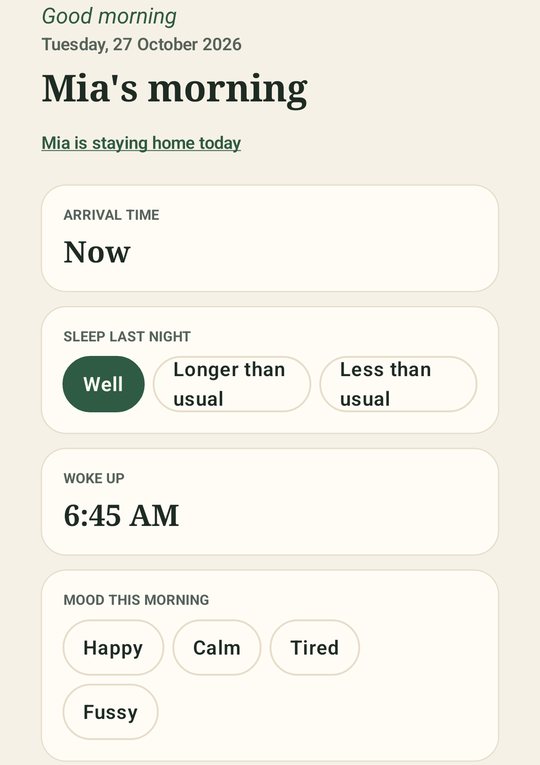
Ang morning slip, nasa telepono na
Bago ihatid ang anak, sinasabi ng magulang sa teacher kung kumusta ang umaga (pagdating, tulog, mood, isang note). Wala nang pila sa pinto.
-
Nagiging Bulletin ang inyong mga email
Mag-email lang sa mga pamilya gaya ng ginagawa ninyo ngayon. Napupunta ang bawat email sa Bulletin at sa kalendaryo, kasama ang mga flyer. Ang anumang hindi malinaw ay naghihintay muna na matingnan ng opisina.
-
Ang wika ng bawat pamilya
Mababasa ang bawat screen at bawat post ng paaralan sa sariling wika ng pamilya, at isang tap lang ang “Ipakita ang orihinal”.
English · Español · 简体中文 · 繁體中文 · 한국어 · Tiếng Việt · Filipino · සිංහල · தமிழ் · हिन्दी
-
Sundo at sign out
Tina-tap ng mga magulang ang “Papunta na ako” para maihanda ng mga teacher ang mga bata. Kapag in-on ito ng inyong paaralan, nagsa-sign in at sign out ang mga magulang gamit ang daliri sa kanilang telepono.
-
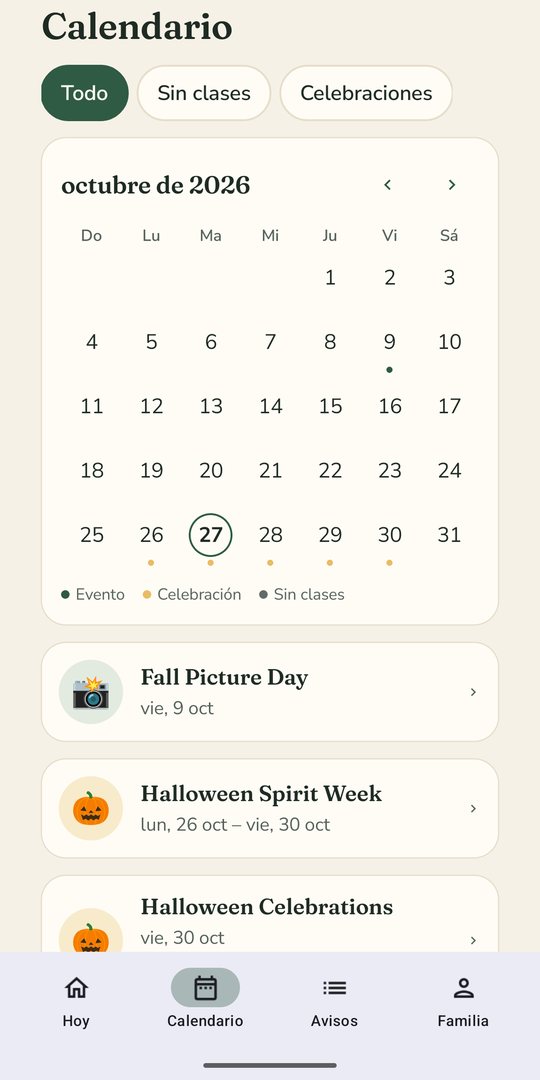
Kalendaryo at mga sign-up sheet
Mga araw na walang pasok, mga pagdiriwang at sign-up ng mga volunteer sa iisang lugar. Nakikita ng mga pamilya kung ano na ang kinuha, pero hindi kung sino ang kumuha.
-
Pribado mula sa simula
Walang ad, walang tracking, hindi kailanman ibinebenta. Sariling anak lang ang nakikita ng bawat pamilya, at hindi kailanman nakikita ng isang paaralan ang iba.
Ma-set up sa isang upuan lang
Ginagabayan ng setup assistant ang director sa logo, mga classroom, kalendaryo at mga form, isang hakbang sa bawat pagkakataon. Gumagana ito sa anumang phone, tablet o computer, kaya hindi kailangan ng iPad.
iPhone, iPad, Mac, Android at ang web.
Ginawa kasama ang isang tunay na Montessori school
Binuo ang Bryo kasama ang isang Montessori school sa Southern California, para sa mga director, teacher at magulang na hindi sanay sa maraming teknolohiya. Mahinahon, simple at magaan basahin.
Switch from Any Legacy Platform in 9.5 Minutes
Export your existing roster and emergency contacts. Our AI Roster Parser & Lens Scanner maps families, tags medical allergies, and organizes rooms with zero director data entry.
Open Brightwheel > Reports > Student List > Export CSV.
Automatic column normalization, family deduplication, and allergy tagging.
- ✓ 68 Students Extracted
- ✓ 112 Parent Contacts Linked
- ✓ 0 Keystrokes Required
Apple App Clip QR codes + Google Play Instant links distributed to parents in seconds.
Parents check in instantly via QR or SMS
Download your active classroom rosters and emergency contact sheets.
Infant, Toddler, and Primary groups mapped to Bryo room keys.
- ✓ Room Menus & Schedules Intact
- ✓ Emergency Authorizations Sealed
Staff tablets immediately load with complete attendance and medical alerts.
Export student records and billing family accounts from Procare Cloud.
Say goodbye to proprietary fingerprint scanners and badge hardware ($35–$120/mo saved).
- ✓ Use Any Phone, Tablet or PC
- ✓ Zero Hardware Leases
Accept checks, cash, Zelle, direct bank ACH, or link straight to your school’s own merchant portal — 0% markup.
Point camera at paper emergency cards and preadmission health histories.
Clean, high-contrast, searchable PDF archives generated directly on phone or tablet.
- ✓ 18.5 Hours/Week Labor Reclaimed
- ✓ Zero Lost Clipboards
Instant digital inspection binder ready for state licensing evaluators anytime.
Built for Exact State Licensing Regulations
Pre-configured statutory staff-to-child ratios, official state inspection forms, digital vector signatures, IRS Form W-10 statements, and USDA CACFP meal reimbursement tracking.
Built-in California Licensing Forms:
- 📋 LIC 700: Identification & Emergency Information
- 📋 LIC 702: Child's Preadmission Health History — Parent's Report
- 📋 LIC 627: Consent for Emergency Medical Treatment
- 📋 LIC 9227: Individual Infant Sleeping Plan (under 12 months)
- ✍️ 22 CCR § 101229.1: Digital vector finger sign-in/out with legal timestamp
Built-in Texas Licensing Forms:
- 📋 Form 2935: Admission Information & Operational Policies
- 📋 Form 2936: Child Hearing and Vision Screening Verification
- 📋 Form 7255: Daily Activity & Feeding Schedule Log
Built-in Florida Licensing Forms:
- 📋 CF-FSP 5219: Child Care Enrollment Form
- 📋 CF-FSP 5012: Daily Attendance & Sign-Out Record
Built-in New York Licensing Forms:
- 📋 OCFS-LDSS-4433: Child Day Care Enrollment Form
- 📋 OCFS-6000: Child Day Care Medical Statement
Built-in Washington Licensing Forms:
- 📋 DCYF Emergency Info Card: Child Emergency Information Record
- 📋 DCYF Individual Care Plan: Special Health & Allergy Protocol
Built-in Illinois Licensing Forms:
- 📋 CFS 600: Application for Child Care Services
- 📋 CFS 602: Child Medical Report
Kunin ang app
- App Store Malapit na
- Google Play Malapit na
- Buksan sa web
Handa kami kapag handa na kayo
Ikuwento ninyo sa amin ang inyong paaralan. Ise-set up namin ito kasama ninyo at ipapadala namin ang inyong presyo.